There are two types of voice channels available in-game. Team Channel is on by default whenever a player joins a random team on any gamemode queue. Players will have the option to join a Party Channel once you join an existing party, or create one themselves. Players can only talk on a single channel at any given time.
Team Channels are accessible by anyone on the same team regardless of party members.
Party Channels are only available once you are part of an existing party channel. Players can switch to the Team Channel in-game to talk to teammates outside your party.
Players can mute others’ microphones by clicking on the speaker icon right beside their name on the voice channel.
Voice Chat Options
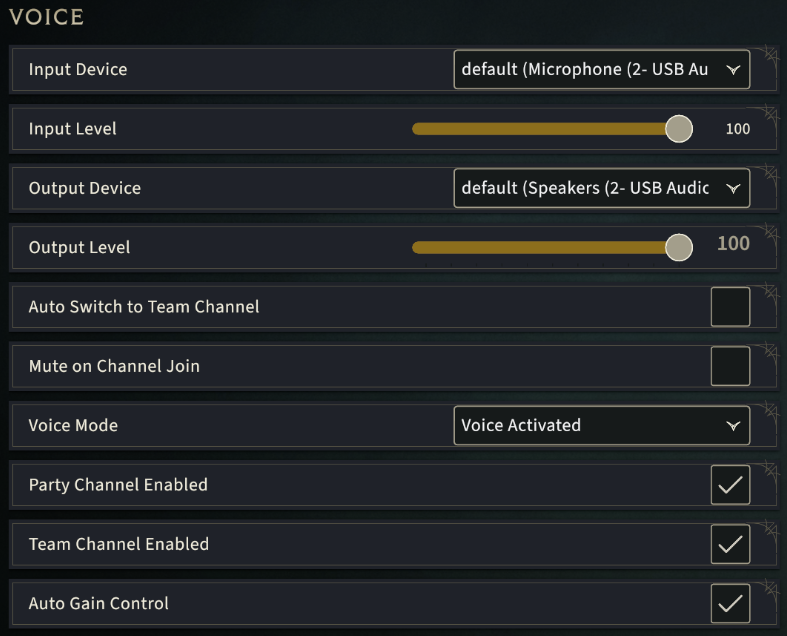
Several voice option settings are also available for players to customize under the Sound settings on the in-game Options Menu.
Input & Output options - Change the input and output devices as well as the volume level for each active device.
Voice Mode - This option allows to toggle between Voice Activated or Push-to-talk. This setting is toggled to Voice Activated by default.
Auto Switch to Team Channel - Enabling this option allows one to automatically switch to the available Team Channel as soon as a game starts.
Channel Toggles - Players can enable or disable each channel entirely which will prevent them from joining them.